Posts

Showing posts with the label SharePoint

Change the language settings on every mysite

Running a SharePoint Site with different languages? No problem! But making sure every user has the correct language settings? Maybe a problem. So why don't using Powershell? 1 2 3 4 5 6 7 8 9 10 11 12 13 14 15 16 17 18 19 20 21 22 23 24 25 [Microsoft.SharePoint.SPSecurity] ::RunWithElevatedPrivileges({ # Enables SELECTED installed languages for each subsite in a site collection $webAppURL = "https://mysiteurl/" $webApp = Get-SPWebApplication $webAppURL foreach ( $spSite in $webApp .Sites){ $spWeb = $spSite .RootWeb $spWeb .IsMultilingual = $true $WebRegionSettings = New-Object Microsoft.SharePoint.SPRegionalSettings( $spWeb ); foreach ( $language in $WebRegionSettings .InstalledLanguages) { If ( $language .DisplayName -eq "English" -or $language .DisplayName -eq "German" ) { # Add the displayname of any langauge you have installed: -or $language.DisplayName -eq "Norwegian" -or $la...

SharePoint Framework Field Customizer project with multiple columns

Image
SharePoint Framework is growing fast and is doing well. With Field Customizer you can build an own rendering for columns in views like you used to build in CSR with JSLink. So there is an guide by Microsoft how to migrating your CSR applications into SPFx applications. It makes sense using this guide, because the Modern UI does not support CSR. The only struggle I had: Some CSR applications are rendering more than one column. So here is the topic of this post: How to build a SPFx Field Customizer Solution with multiple columns.

Changing the author field in SharePoint

An action nobody should do, but in some cases necessary: changing the author of an item. What do you need? a farm account PoweShell

First click in SharePoint List WebPart on wiki pages

Lets say you have a SharePoint wiki page with some content and you added a list WebPart underneath the text. You open the page and want to go into the list settings or add an item or do another operation you can do inside the ribbon. You will realize the ribbon is not there. First of all you need to click into the list to make the ribbon visible. There is a simple JavaScript solution.

Add the Blog template to an existing SharePoint Site

When you want a blog in SharePoint you typically create a Site Colletion or Subsite with the blog site template. In some cases you have created a team site, because of its features. But you want to use the blog features, too. So you need to activate the feature. To do so you need the the SharePoint Management Console - the UI does not allow you activating the feature.

Set SharePoint's PeoplePicker value with jQuery

PeoplePicker and default values - not so easy in SharePoint. So if you want a default value for a field you need to set it by your own, but how?

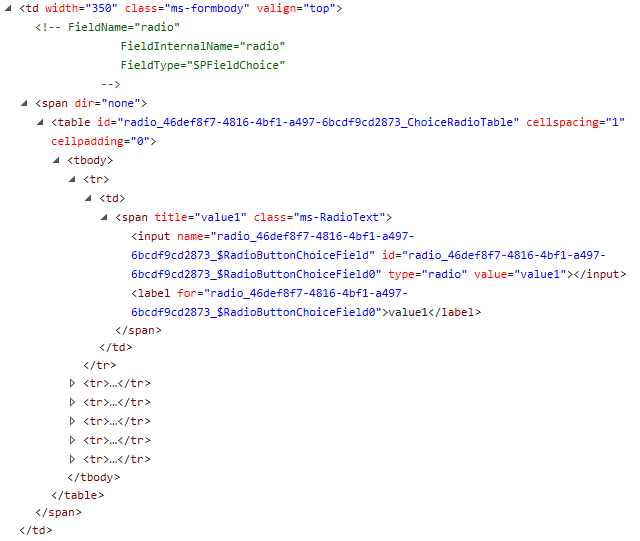
SharePoint's Choice Fields: how to arrange checkboxes or radiobutto in one row

Image
Of course there are multiple reasons to use checkboxes or radiobuttons - even in SharePoint. But the most common problem: if you have more than three choices your form is blowing up. The solution is to arrange them in a row. To do so we need to take a deeper look.

Canceled events in SharePoint calendar

Email-enabled calendars are great. Just add the calender into the recipients and your event appears in the SharePoint calendar. But what if you cancel the event? The event will be deleted in Outlook, but not in SharePoint..

Content Type Hub in SharePoint Online

Standards are good and sometimes you want some standards in SharePoint Online. A useful tool is the Content Type Hub. You should know it from SharePoint 2010 and 2013. Whenever you need it, you can create one, by activating the Site Collection Feature "Content Type Syndication Hub". This feature allows you to publish your Site Columns and Site Content Types to every other site Collection. So you might thing you can build your hub in SharePoint Online by activating the feature on a new Site Collection. If you do so you will get an error. It tells your proxy is not working correctly, but this is not true. In fact there is already an hub and you cannot build a second one. The hub is hidden so you cannot see it in the Site Collection Overview in your admin center. You need to know the URL: https://yourprefix.sharepoint.com /sites/contenttypehub  

Restart the SharePoint OWSTIMER

There are a lot reasons to restart the Timer Job in SharePoint. You can do it by going to Services and stop the owstimer service. Is this the only way? Are there more even better ways? Well, there are some other ways, but there is no best practice. 

SharePoint REST - get more than 100 list items

Since SharePoint 2013 you can use REST calls to get or set data. But if you firing a call against a list with 101 items you will get only 100. The cause is based at the REST interface. To reduce server overload the result is limited - it is called server paging. That is pretty smart, but what if you need all results? There are two ways of solving this problem. The first and easy one is to set the $top flag. So you add ?$top=101 to your REST call and you will get all 101 items. This works fine until you have 102 items.

SharePoint 2010 "Navigate Up" points to the wrong URL

Image
Today I had a problem with the "Navigate Up" button in SharePoint 2010. The server moved once to a new URL, but the navigation was still pointing to the old one. The internet told me to change the masterpage.

Refresh the User Information List in SharePoint

If you are going into the User Information List, you will sometimes see it is not up to date. There are two jobs (User Profile to SharePoint Quick Sync and User Profile to SharePoint Full Sync). The quick sync will only add new member into your list and somehow it does not work sometimes. So you need to trigger the full sync. The question is how.. there is no point in the UI to do so and not even PowerShell is able to start it. The good old stsadm will rescue us. There are two commands you need to execute in your SharePoint Managing Shell (as administrator).

SharePoint get field by GUID with PowerShell

Once I was looking for a problem in SharePoint, I've spent some time digging the ULS Logs. There was an error with the message " Failed caching field with id '{GUID}' ". The first problem I had was the question: which field? So I decided to build a script that returns the name of the field. After I knew the name, I wanted to know where the field is used, so I extended the script. Now it returns the Lists and Content Types where the field is in use.

Redirect in SharePoint provider hosted Add Ins

If you are using an asp:hyperlink to another page in your provider hosted app you will see the SharePointContextProvider will not be able to handle the redirect. To fix the problem you need to add a click event and call a redirect in your code behind.

register and debug provider hosted SharePoint Online Add Ins with tenant full controll

It is a while since Microsoft launched the Add In (or App) architecture for SharePoint, but there are still things they change or we are not familiar with. In August 2016 there was a change in giving tenant permissions to provider hosted Add Ins using app-only mode and Azure Access Control Service (ACS).

updating multiple list items in SharePoint with JavaScript without using promisses or other stuff

You maybe know the problem; you are updating or creating a set of items using the JSOM and the changes are made to only one item. The  reason is that the process in the back (Event Receiver etc.) can handle only one item at the same time and if it takes to long it misses the update event for the other items. So you need to make sure the update waits until the update before is done. The deal is that the JSOM context works asynchronous. Some of you are using promisses or methods like that. I made a solution that is working without any other library.

Wait dialog in SharePoint 2013 with JavaScript

Some actions in SharePoint (e.g. executing querys) can take a while. You want the user to not do any action or even change the data while your process is running. So you need the wait dialog that SharePoint is displaying some time. Calling the dialog is pretty easy. All you need is a line of code.

Refresh SharePoint ListView without refreshing the page

Of course you have once updated a SharePoint listitem out of the list view. To display the results you've updated the whole page. But you do not need to. With this simple statement you can update the view without any redirect or refreshing of the page:

ClientSideRendering basics 2

Image
In my last post  I extended the view of a list. The goal was to add the unit of measurement next to a numeric value. Now I want to extend it by adding the unit into the forms (new, edit and display) of this list. This is how the form usually looks like: At first we need to write the code.